Running an accessibility checker on one page is easy. Running it on every page of a site, and turning the results into something a person can read and act on, isn't. In 2020 I built a small Node.js tool for that: it runs Pa11y with the aXe engine across a list of pages or a whole sitemap and writes one report. Six years later I cloned it back down and pointed it at the site you’re reading. Getting it to run took an afternoon. Getting it to tell the truth took a bit longer, and that’s the story here.
Built at Sandstorm Design in 2020, and rebuilt as a personal project in 2026.
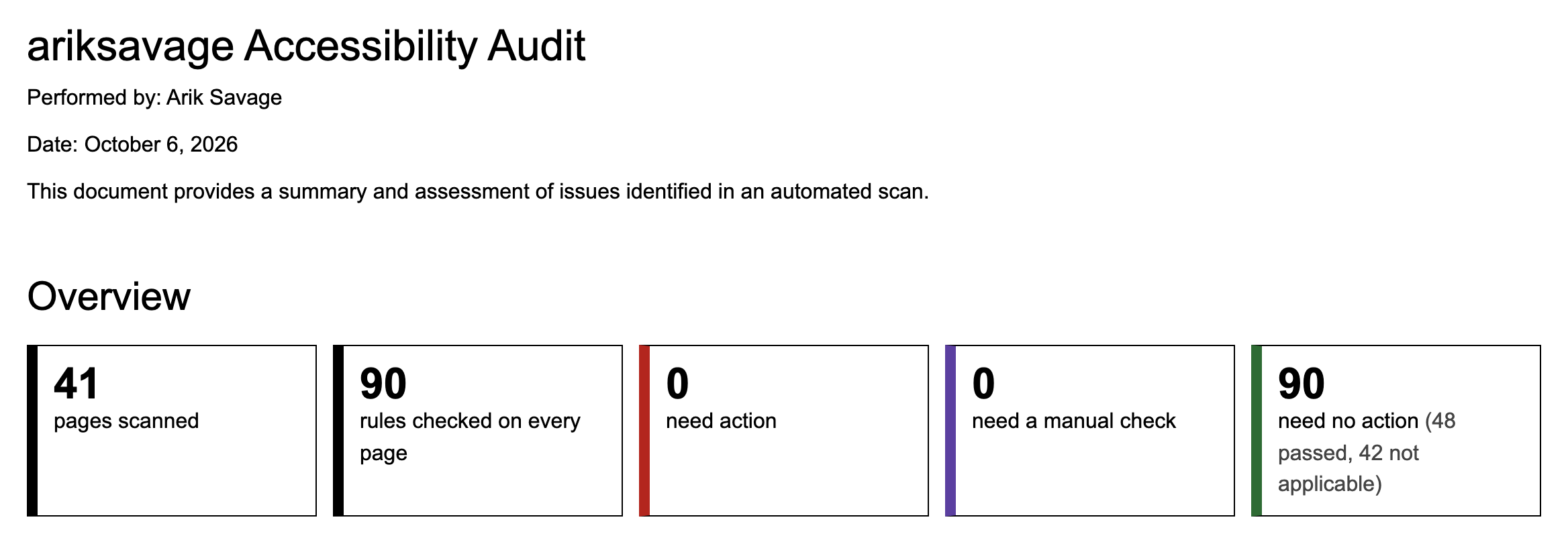
90rules checked on every page, each one listed and explained in the report, pass or fail
272 → 0results that needed a person to check by eye, once the tool could measure contrast from pixels
2.67 → 4.74contrast ratio of the one real failure it found on this site, fixed and rescanned the same day
Six years on a shelf
The tool was three commits on one day in December 2020, and then it sat. Getting it running again was mostly archaeology. Pa11y had gone from version 5 to version 10 and brought a current Chrome and a current aXe with it. The dependency list included fs, http and readline, which are built into Node; the npm packages by those names are empty placeholders. Out they went.
A few things were simply broken. The date stamp used the day of the week where it meant the day of the month. The report crashed if a severity level had no issues at all, which on a healthy site is exactly what you’re hoping for. And one unreachable page would end the whole run, taking the results from every page before it down too.
My favorite bug
The file-naming helper could never have worked as committed. Inside the function, var dateStamp is hoisted to the top of the function and shadows the dateStamp() function it’s about to call. By the time the right-hand side runs, dateStamp is the new, still-undefined variable, and Node says so: dateStamp is not a function.
JavaScript
function fileName(client, path, ext){
  // Before: the local var shadows the function it calls.
  // var dateStamp = dateStamp();
  // var filename = path+client.toLowerCase()+'-a11y-'+dateStamp+'.'+ext.replace('.','');

  // After: no local, no shadow.
  var filename = path+client.toLowerCase()+'-a11y-'+dateStamp()+'.'+ext.replace('.','');
  return filename;
}
One variable name, reused one line too soon.
The first answer was wrong
The first full run against this site covered 41 pages from the sitemap and reported 91 color-contrast failures, 80 of them on a single case study. That looked like a real problem with one page.
Then I ran it again and got 10. Same site, same tool, minutes apart. An audit that changes its mind is not an audit, so I went looking. Content on this site fades in as each page loads, and the scan was starting before the fade had finished. Text caught at half opacity really does fail a contrast check. It just isn’t what anyone sees.
A two-second pause before each scan fixed it, and the failures went to zero. That felt great for about an hour.
What it wasn’t checking
Anything below “serious”
Pa11y files aXe’s moderate and minor findings as warnings and notices, and hides both unless asked. The tool had never asked. Skipped heading levels and content outside of landmarks are typically moderate, so a clean report had been covering only part of the rulebook.
Accessibility Testing Tools
Node.js
The standard on the cover
The 2020 report said “WCAG 2.0 AAA” at the top. The current aXe runner tests Levels A and AA plus best practices, whatever you pass it. The report now states what really ran: WCAG 2.0, 2.1 and 2.2 at A and AA, with the aXe version beside it.
Accessibility
Documentation
Anything below the fold
The diagrams on this site stay invisible until you scroll to them, and aXe skips whatever is hidden. Every diagram on every case study had been sailing through untested. The tool now scrolls each page from top to bottom and waits for the animations to finish before it looks.
Automated Software Testing
Accessibility
272 things to check by hand
With those gaps closed there were still no confirmed failures, but there were 272 results marked for a manual check. All of them were color contrast, and nearly all were labels inside the SVG diagrams. aXe works out contrast from the structure of the page, and it can’t tell that a <text> label is sitting on a <rect> drawn in the same SVG. So it shrugs and hands the question to a person.
A person can answer it by looking, and so can a screenshot. For each element aXe gives up on, the tool takes a picture of the text, hides the text and takes another, then compares the two. The pixels that changed are the letters. What’s left in the second picture is the background. If a label straddles two backgrounds, it’s judged against the worse one, and text over a photo or gradient still goes to a person, because there the honest answer really is “it depends”.
On this site that settled all of them: 337 elements measured, once the scrolled-in diagrams were counted, and nothing left for manual review.
The one it caught
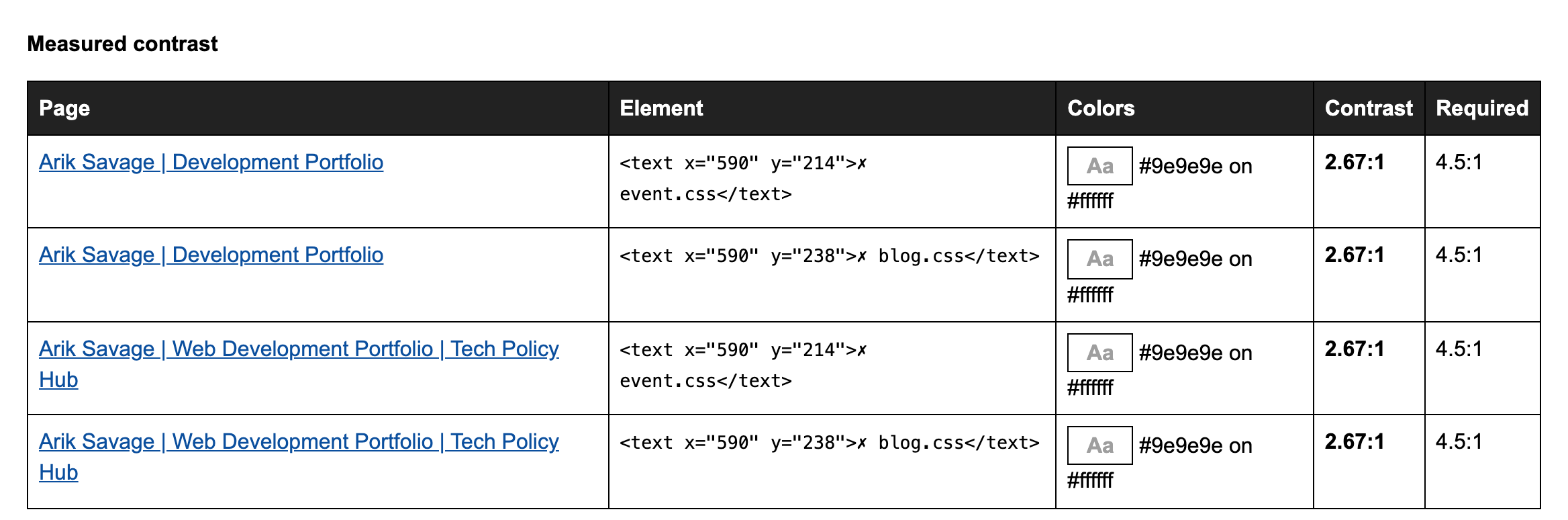
333 of those passed. Four didn’t, and they were the same two labels on two pages. In the Tech Policy Hub diagram, the stylesheets a page doesn’t load were dimmed to 45% opacity, which came out as pale gray on white at 2.67:1. The minimum for text that size is 4.5:1.
Nothing had flagged it before, for two reasons at once: the diagram was hidden until scrolled to, and it was SVG. The fix was one line. At 65% opacity the labels still read as dimmed and measure 4.74:1. I deployed it, ran the audit again, and the report came back clean.
The report’s measured-contrast table before the fix, reproduced on a local copy of the site.
The report
Every rule, pass or fail
The old report listed only what went wrong, which left no way to tell “passed” from “never checked”. The new one lists all 90 rules. Each is marked as needing action, needing a manual check, or needing nothing, and the last of those says whether the rule passed or simply had nothing on the site to test.
Accessibility
Documentation
Sorted for the person fixing it
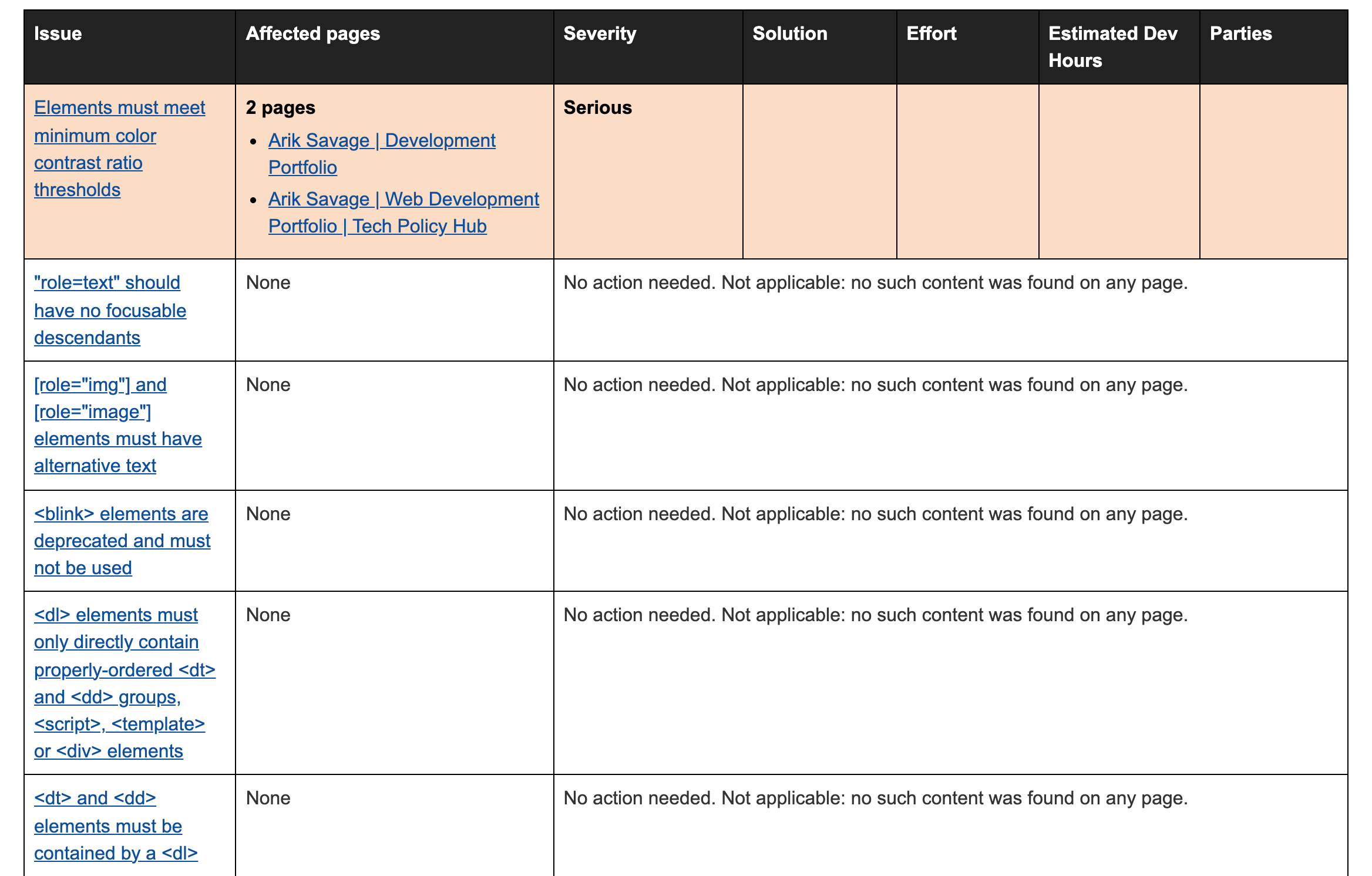
The summary table puts the most severe and most widespread issues first, color coded by severity with the severity also written out, since color alone would fail the very rules being tested. Each issue lists the pages it affects by their own page titles and links to a plain-language explanation with an example element.
Accessibility
UI/UX
Room for judgment
Solution, effort, estimated hours and who’s responsible are judgment calls, so those cells are left for a person. They can be typed into right in the report and are saved as you go. Notes are kept per rule, so they’re still there after the next scan.
Node.js
JavaScript
A palette for free
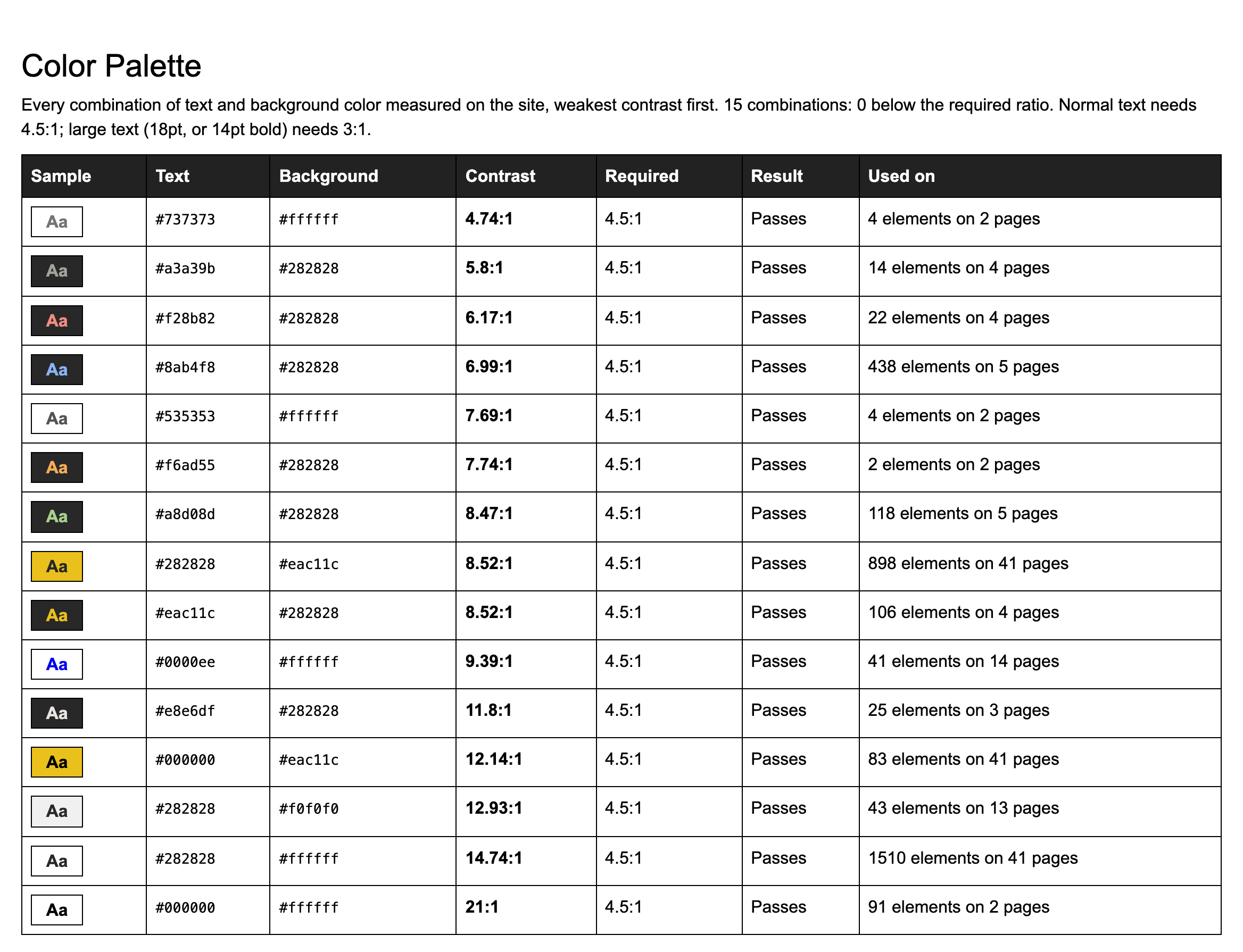
aXe records the colors of every piece of text it measures, so the report ends with every text and background combination found on the site, weakest contrast first. This site has fifteen. It’s the fastest way to see whether a contrast problem is one stray element or a color choice.
Accessibility
CSS
Signed, once
The 2020 report had the agency’s name typed straight into the code. Now the byline comes from a small .author file. The first run asks for a name, offers your git user name as the default and saves the answer. The file stays out of version control, so anyone who clones the tool gets their own byline instead of mine.
Node.js
What it doesn’t do
A clean report is good news with a caveat attached. An automated scan checks what a machine can check: one browser, one screen size, and each page as it first loads. It can’t tell whether alternative text is any good, whether the reading order makes sense, or what the site is like with a keyboard or a screen reader. It’s where an audit starts.
It has also only been proven on one site so far, and a small, well-behaved one. The next step is a printable version of the report that can be handed to a client.
Looking back
The revival was the easy part. What I’d underline is how many ways a scan can be wrong while looking right. It can run too early, skip what it can’t see, drop what it was told to ignore, and report a stricter standard than it tested. None of those raised an error. Each one only showed up because a number looked off and I went and asked why.