NOW Foods: The Great Nutrition-Table Rescue
- Live site: nowfoods.com
- Role: Lead Developer
- At: Sandstorm Design
- Date: Feb 2021
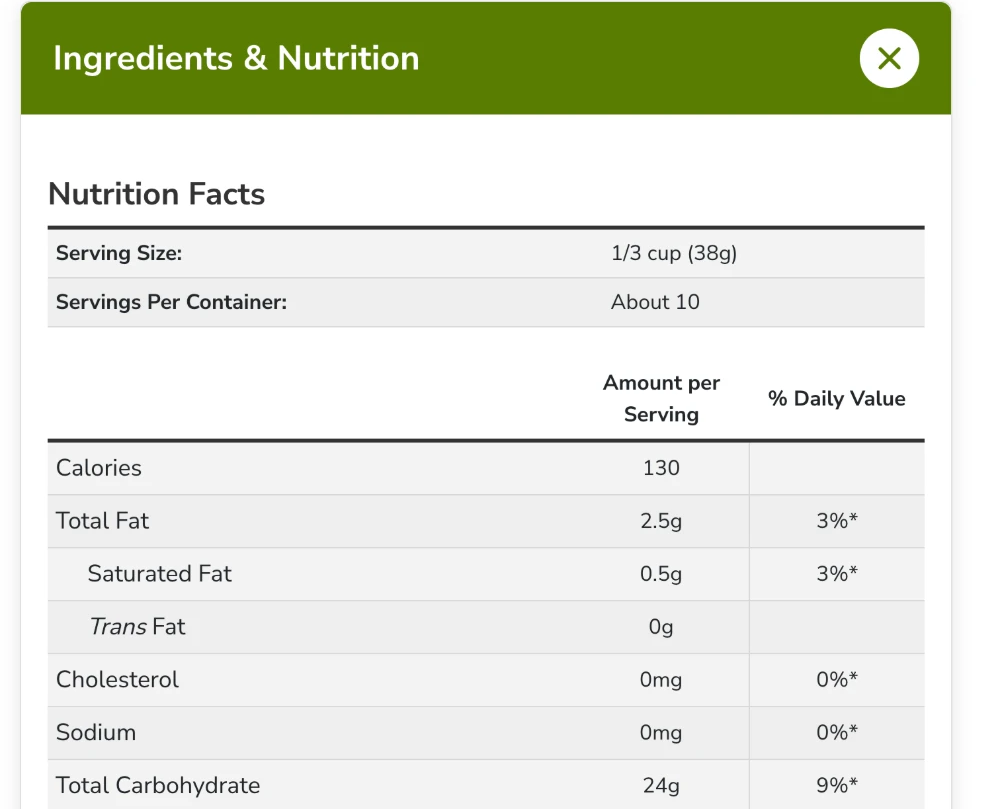
Every supplement and food NOW sells comes with a nutrition table, and on their old site those tables were a screen reader’s nightmare. After an ADA lawsuit threat, every one of them had to be fixed, across a catalog of about a thousand products. This is the story of how I did that in 2019, early in NOW’s rebuild, and of the playbook I wrote in 2021 so the same tables could travel to another storefront.
- ~1,000 products’ nutrition tables parsed into structured data
- ~90% of the conversion automated, with a human sign-off on every product
- Hundreds of hours of retyping saved
Copied, pasted, and mangled
On the old site, product info (nutrition facts, dosages and the like) lived in HTML tables that got copied from one product to the next and edited by hand. Like a photocopy of a photocopy, every generation came out a little worse: a stray tag here, a lost header there, until the markup was a mess screen readers couldn’t make sense of. After an ADA lawsuit threat, NOW needed every one of those tables fixed. Across the whole catalog.
Parse once, approve, replace
My answer was a background PHP process that read each product’s old table and pulled it apart. A row like <tr><td>Iron</td><td> </td><td>11%</td></tr> became structured data like {"Iron": {"daily-value": "11%"}}, thanks to a multi-pass cleanup and a healthy pile of regular expressions. Each value got its own Drupal field, and each product only ever got parsed once.
The important part: the old markup stayed put until an admin reviewed the parsed data and approved it. Every field stayed editable, so any weird edge cases could be fixed by hand. Once approved, the old table was swapped for a clean, templated one.
The new tables have proper row and column headers and ARIA labels, so screen readers understand how the cells relate without relying on bold text or position. They look almost exactly the same, but underneath they’re clean and compliant. The client loved the mix: about 90% automated, with a real person still catching the oddballs. That saved hundreds of hours of retyping.
A bonus: with every value in its own field, a question like “show me products with less than this much sugar” became a simple database query. We never built that filter, but the data was ready for it.
Before: copied, pasted, and hand-edited
Here’s one real product, NOW’s Organic Oat Bran, as it appeared on the old site in 2017 (via the Wayback Machine). Look at the body rows: every label is a plain <td>, sub-items are indented with , and the column header screen readers need is hidden with visibility: hidden.
<table class="nf_facts_panel">
<caption>Nutrition Facts</caption>
<thead>
<tr class="nf_serving_size">
<th scope="row">Serving Size:</th>
<td colspan="2">1/3 cup (38g)</td>
</tr>
<tr class="nf_servings_per_container">
<th scope="row">Servings Per Container:</th>
<td colspan="2">about 10</td>
</tr>
<tr class="nf_facts_details_head">
<th scope="col" style="visibility:hidden">Description</th>
<th scope="col">Amount per Serving</th>
<th scope="col">% Daily Value</th>
</tr>
</thead>
<tfoot>
<tr>
<td colspan="3">* Percent Daily Values are based on 2,000 calorie diet.<br>† Daily Value not established.</td>
</tr>
</tfoot>
<tbody>
<tr>
<td>Calories</td>
<td>90</td>
<td> </td>
</tr>
<tr>
<td>Calories from Fat</td>
<td>25</td>
<td> </td>
</tr>
<tr>
<td>Total Fat</td>
<td>2.5 g</td>
<td>4%</td>
</tr>
<tr>
<td> Saturated Fat</td>
<td>0.5 g</td>
<td>3%</td>
</tr>
<tr>
<td> Trans Fat</td>
<td>0 g</td>
<td> </td>
</tr>
<tr>
<td>Cholesterol</td>
<td>0 mg</td>
<td>0%</td>
</tr>
<tr>
<td>Sodium</td>
<td>0 mg</td>
<td>0%</td>
</tr>
<tr>
<td>Total Carbohydrate</td>
<td>25 g</td>
<td>8%</td>
</tr>
<tr>
<td> Dietary Fiber</td>
<td>6 g</td>
<td>24%</td>
</tr>
<tr>
<td> Soluble Fiber</td>
<td>3 g</td>
<td> </td>
</tr>
<tr>
<td> Sugars</td>
<td>0 g</td>
<td> </td>
</tr>
<tr>
<td>Protein</td>
<td>7 g</td>
<td>14%</td>
</tr>
<tr>
<td>Vitamin A</td>
<td> </td>
<td>0%</td>
</tr>
<tr>
<td>Vitamin C</td>
<td> </td>
<td>0%</td>
</tr>
<tr>
<td>Calcium</td>
<td> </td>
<td>2%</td>
</tr>
<tr>
<td>Iron</td>
<td> </td>
<td>11%</td>
</tr>
</tbody>
</table>After: built from structured fields
The same product on the live site today. Every row label is a real <th>, indentation is a class instead of spaces, the hidden header is sr-only so screen readers still find it, and serving size lives in its own small table instead of pretending to be part of the grid.
<table class="structured-fact-panel-table servings" aria-label="Nutrition Facts Servings">
<caption>Nutrition Facts</caption>
<tbody>
<tr class="serving-size">
<th scope="row">Serving Size:</th>
<td>1/3 cup (38g)</td>
</tr>
<tr class="servings-per-container">
<th scope="row">Servings Per Container:</th>
<td>About 10</td>
</tr>
</tbody>
</table>
<table class="structured-fact-panel-table responsive-table ingredients stacktable large-only" aria-label="Nutrition Facts Ingredients" data-once="alter-tables" id="responsive-table-1">
<thead>
<tr class="main-header-row">
<th scope="col" class="description"><span class="sr-only">Description</span></th>
<th scope="col" class="per-serving">Amount per Serving</th>
<th scope="col" class="daily-value">% Daily Value</th>
</tr>
</thead>
<tbody>
<tr>
<th scope="row">
<p>Calories</p>
</th>
<td class="per-serving">130</td>
<td class="daily-value"></td>
</tr>
<tr>
<th scope="row">
<p>Total Fat</p>
</th>
<td class="per-serving">2.5g</td>
<td class="daily-value">3%*</td>
</tr>
<tr>
<th class="description indent-1">
<p>Saturated Fat</p>
</th>
<td class="per-serving">0.5g</td>
<td class="daily-value">3%*</td>
</tr>
<tr>
<th class="description indent-1">
<p><em>Trans</em> Fat</p>
</th>
<td class="per-serving">0g</td>
<td class="daily-value"></td>
</tr>
<tr>
<th scope="row">
<p>Cholesterol</p>
</th>
<td class="per-serving">0mg</td>
<td class="daily-value">0%*</td>
</tr>
<tr>
<th scope="row">
<p>Sodium</p>
</th>
<td class="per-serving">0mg</td>
<td class="daily-value">0%*</td>
</tr>
<tr>
<th scope="row">
<p>Total Carbohydrate</p>
</th>
<td class="per-serving">24g</td>
<td class="daily-value">9%*</td>
</tr>
<tr>
<th class="description indent-1">
<p>Dietary Fiber</p>
</th>
<td class="per-serving">4g</td>
<td class="daily-value">14%*</td>
</tr>
<tr>
<th class="description indent-2">
<p>Soluble Fiber</p>
</th>
<td class="per-serving">2g</td>
<td class="daily-value"></td>
</tr>
<tr>
<th class="description indent-1">
<p>Total Sugars</p>
</th>
<td class="per-serving"><1g</td>
<td class="daily-value"></td>
</tr>
<tr>
<th class="description indent-2">
<p>Includes 0g Added Sugars</p>
</th>
<td class="per-serving">
<p>0</p>
</td>
<td class="daily-value">0%*</td>
</tr>
<tr>
<th scope="row">
<p>Protein</p>
</th>
<td class="per-serving">6g</td>
<td class="daily-value"></td>
</tr>
<tr>
<th scope="row">
<p>Vitamin D</p>
</th>
<td class="per-serving">0mcg</td>
<td class="daily-value">0%*</td>
</tr>
<tr>
<th scope="row">
<p>Calcium</p>
</th>
<td class="per-serving">17mg</td>
<td class="daily-value">2%*</td>
</tr>
<tr>
<th scope="row">
<p>Iron</p>
</th>
<td class="per-serving">1.7mg</td>
<td class="daily-value">10%*</td>
</tr>
<tr>
<th scope="row">
<p>Potassium</p>
</th>
<td class="per-serving">179mg</td>
<td class="daily-value">4%*</td>
</tr>
</tbody>
<tfoot>
<tr>
<td colspan="3" class="footnote">
<span class="symbol">*</span>
<span class="description">The % Daily Value (DV) tells you how much a nutrient in a serving of food contributes to a daily diet. 2,000 calories a day is used for general nutrition advice.</span>
</td>
</tr>
</tfoot>
</table>Readable by eyes and ears alike
When NOW began preparing its products for fruitfulyield.com, a storefront selling many manufacturers’ products, each with its own idea of what a nutrition table looks like, I wrote the handoff doc: a markup standard every product description could follow, using NOW’s own tables as the worked example.
The fixes are small, and each one changes what a screen reader actually says. Row labels like “Calories” and “Total Fat” become <th scope="row">, so every value is announced with its label. The blank “Description” column header was hidden with visibility: hidden, which hides it from everyone, screen readers included, so the columns stopped lining up. An sr-only class hides it from the eyes only. The ** and † footnote markers get their meaning spelled out in hidden text right where they appear, instead of in a footer read before the table body even starts. And the serving-size rows, which never matched the table’s columns, move out of the table entirely.
<table class="nf_facts_panel">
  <caption>Supplement Facts</caption>
  <thead>
    <tr>
      <th scope="col" class="sr-only">Description</th>
      <th scope="col">Amount per Serving</th>
      <th scope="col">% Daily Value</th>
    </tr>
  </thead>
  <tbody>
    <tr>
      <th scope="row">Total Fat</th>
      <td>3 g</td>
      <td>4%**<span class="sr-only">Percent Daily Values are based on a 2,000 calorie diet.</span></td>
    </tr>
    <tr>
      <th scope="row">Polyunsaturated Fat</th>
      <td>2 g</td>
      <td>†<span class="sr-only">Daily Value not established.</span></td>
    </tr>
  </tbody>
</table>Looking back
The parser gets the attention, but the part I’m most proud of is the sign-off step. Automation got us 90% of the way, and a person looking at every product caught the rest before anything went live. Nobody had to trust a pile of regular expressions with a legal problem. The handoff doc came from the same instinct: fixing the tables once wasn’t the goal. The goal was never having to rescue them again.
Stack & skills
- Drupal
- PHP
- Regular expressions
- ARIA
- Twig
- Accessibility
- Text Parsing/Regex
- Data Migration
- Data Architecture
- Documentation